
Technical SEO Audit Checklist for E-commerce Sites
Master technical SEO for your e-commerce store with this data-driven checklist. Boost rankings, fix Core Web Vitals, eliminate duplicate content, and increase conversions.
Introduction
Look, if you’re running an e-commerce store, you need to hear this: almost half of your potential traffic comes from organic Google search. We’re talking about 43% of all e-commerce traffic.
And most stores are completely screwing this up.
Your technical SEO is probably broken right now. Over 62% of e-commerce websites have broken links scattered throughout their site. Only about a third pass Google’s Core Web Vitals. While you’re reading this, your competitors are hemorrhaging money from technical mistakes they don’t even know exist.
The difference between stores that dominate page one and those stuck on page five? It’s not the products. It’s not the prices. It’s the technical foundation.
This guide walks you through exactly what to fix. No academic theory. No endless explanations. Just the checklist that separates winning stores from losing ones.
Why E-commerce Technical SEO Hits Different
Traditional blogs and business websites have it easy. They’re dealing with maybe 20 to 50 pages total. You can manually check each page. You can optimize each one individually.
E-commerce? You’re operating at a completely different scale.
You’ve got thousands of product pages. Hundreds of categories and subcategories. Filter combinations that create infinite URL variations. Search functionality. Pagination. Product variants. The complexity multiplies fast.
Here’s what that means: when something breaks technically, it doesn’t break on one page. It breaks across your entire catalog.
The average e-commerce brand ranks for 1,783 different keywords and drives around 9,625 organic visits every month. But most stores never reach this potential because technical issues are killing them at scale.
Think about the multiplication effect: if your site speed sucks, Google encounters thousands of slow-loading pages when they crawl your site. If your canonical tags are set up wrong, you’ve got duplicate content problems multiplied across thousands of URLs. One mobile optimization mistake affects every single product page.
The stakes are massively higher than a regular website. But so is the opportunity.
Fix one technical issue on a regular site, you improve one or two pages. Fix one technical issue on an e-commerce site, you improve thousands of pages simultaneously. That’s the leverage that makes technical SEO so valuable for stores.
Core Web Vitals: Fix These or Keep Losing Sales
Google dropped a bomb in 2021 when they made Core Web Vitals a ranking factor. Then in March 2024, they made it even harder by replacing one of the metrics (First Input Delay) with a new one called Interaction to Next Paint.
Translation: they raised the bar for site performance.
Here’s why this matters to your wallet: when your site takes just one extra second to load, conversions drop by 7%. Pages that load in 2 seconds convert three times more than pages taking 5.7+ seconds to load.
Most e-commerce stores are failing hard at this. About 60% of e-commerce sites can’t pass Core Web Vitals assessments. That’s not a problem for you—that’s your opportunity to dominate while they struggle.
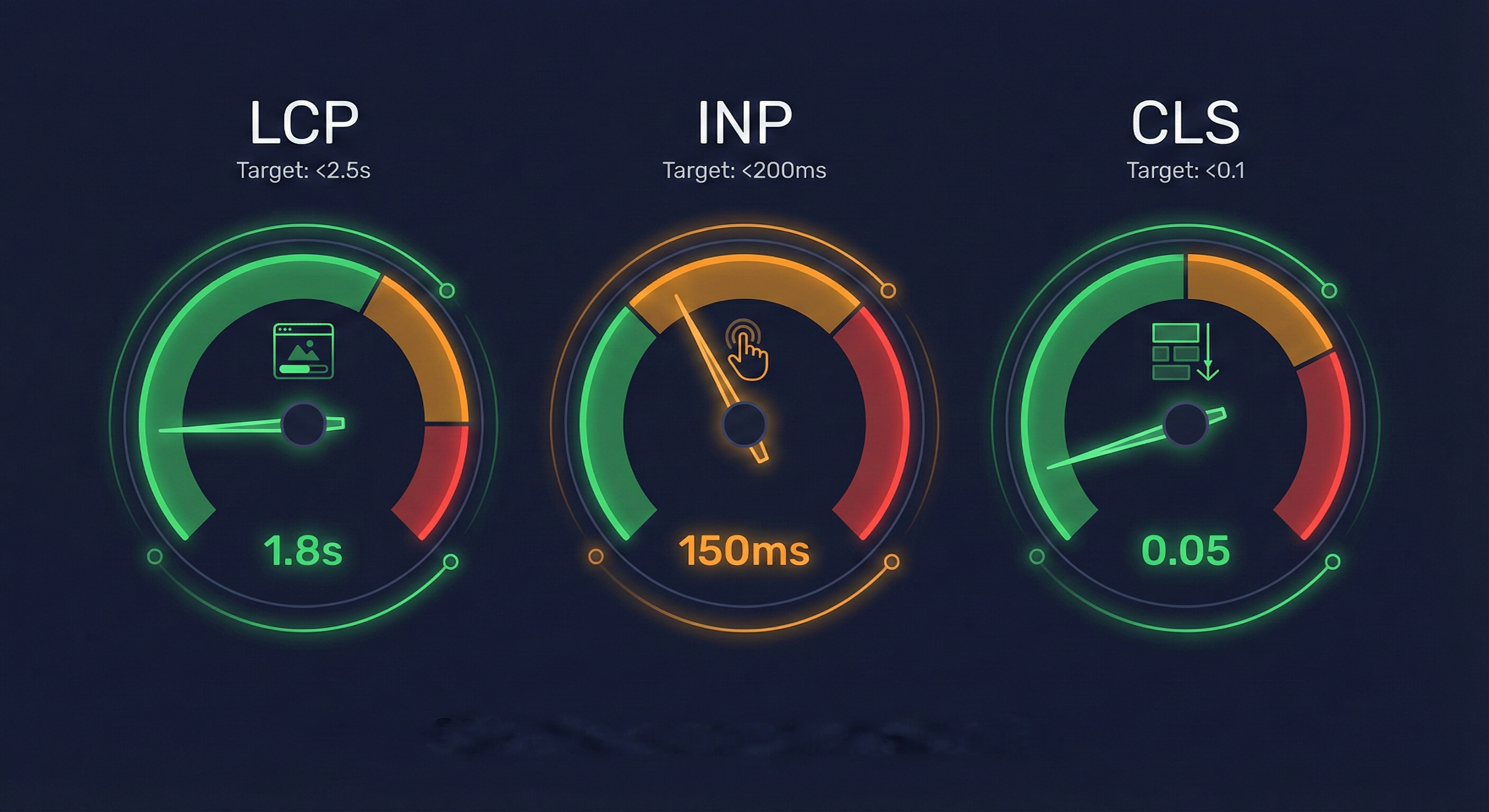
The Three Metrics That Matter
1. Largest Contentful Paint (LCP)
How fast your main content loads. Under 2.5 seconds or you’re losing sales.
Your product images are killing your LCP. Fix it:
- Use WebP or AVIF formats
- Lazy load below-the-fold images
- Preload your hero image
- Use a CDN
Next-gen image formats improve LCP by 22%.
2. Interaction to Next Paint (INP)
How fast your site responds to user interactions. Under 200 milliseconds.
47% of sites fail this. It’s the hardest metric.
Usually it’s:
- Heavy JavaScript from apps you installed
- Unoptimized event handlers
- Render-blocking resources
3. Cumulative Layout Shift (CLS)
Visual stability. Nothing moves when loading.
E-commerce sites fail because:
- Product images load without dimensions
- Dynamic content (reviews, recommendations) shifts layout
- Cookie banners and pop-ups
Get below 0.1.
Site Speed: Where Money Gets Left on the Table
You’ve probably heard “speed matters” before. Everyone says it. But do you actually know the numbers?
Sites that load within 2 seconds keep 91% of their visitors. But when your load time creeps from 1 second to 6 seconds, your bounce rate more than doubles—jumping by 106%.
Think about what that means. You’re literally watching half your potential customers bounce because your site is slow. And the average e-commerce site? They’re scoring 67 out of 100 on Google’s Lighthouse performance test. That’s barely passing.
Here’s the brutal truth: pages that load in under 2 seconds are 3.2 times more likely to win featured snippets. Fast sites don’t just convert better—they rank better too.
What Actually Moves the Needle on Speed
Skip the complicated optimizations. Start with these five fixes that actually work:
1. Cut JavaScript execution time - Reducing JavaScript execution can improve your Largest Contentful Paint by up to 30%. Most stores are running bloated JavaScript from apps they installed and forgot about.
2. Enable compression - Use GZIP or Brotli compression for your HTML, CSS, and JavaScript files. This is basic stuff that most hosts can enable with one click.
3. Set up browser caching - Tell browsers to store your static assets locally. Once someone loads your site once, it’ll be faster every time after.
4. Use a Content Delivery Network - Serve your content from servers physically close to your users. Shopify does this automatically. If you’re on WooCommerce or custom, get on Cloudflare.
5. Clean up your database - Old order data, expired sessions, and unoptimized queries slow everything down. Regular maintenance keeps things fast.
Duplicate Content: The Ranking Killer Nobody Talks About
Most people don’t understand duplicate content. They think it’ll get them penalized by Google. That’s not how it works.
Duplicate content won’t trigger a penalty. But it WILL split your ranking power across multiple URLs. Instead of one page ranking on page one, you’ve got three pages fighting each other, all stuck on page three.
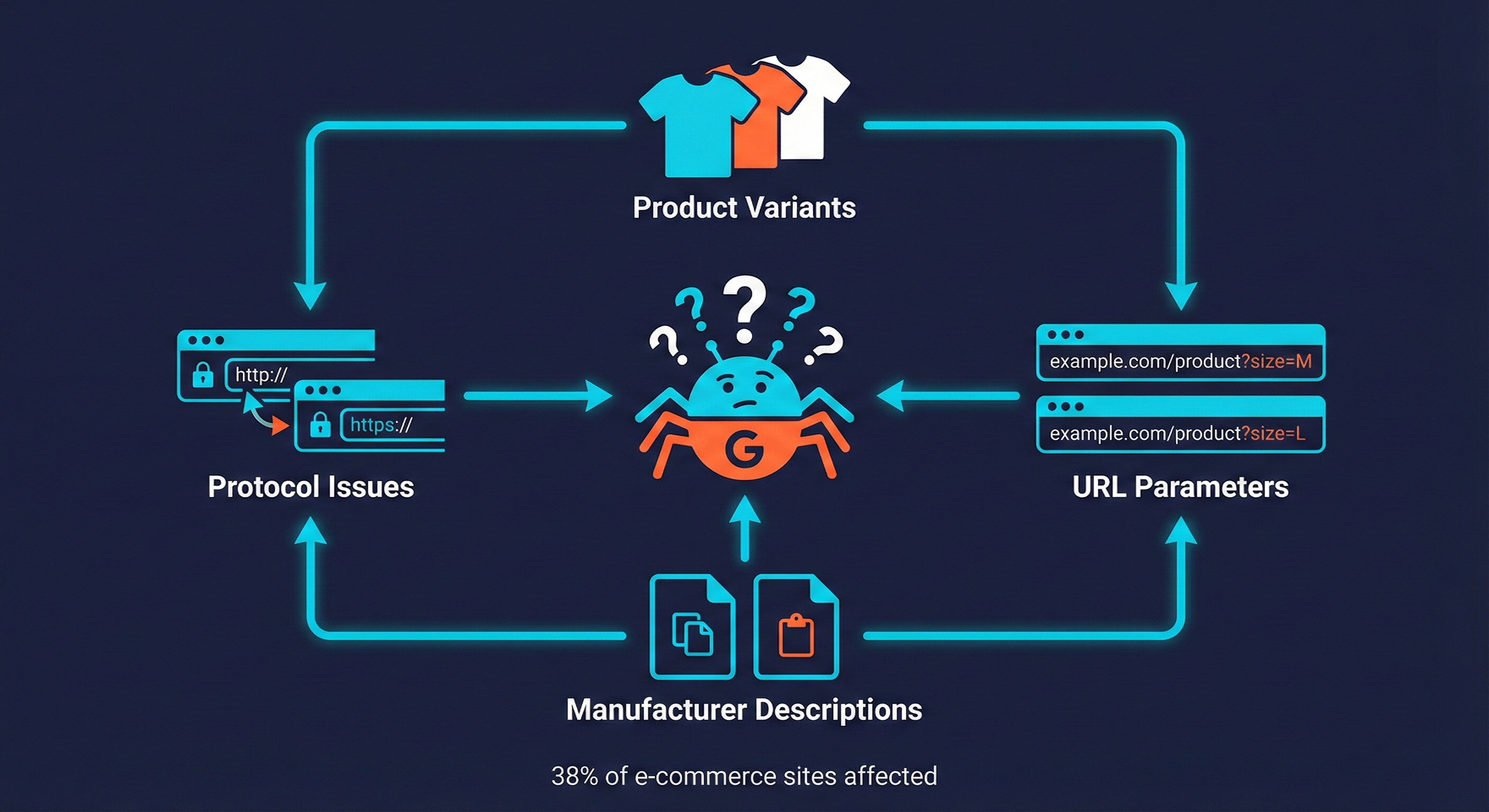
And e-commerce sites are duplicate content factories by design. Research shows about 38% of e-commerce websites have significant duplicate content issues dragging down their rankings.
Where Your Duplicate Content Comes From
Let me show you the four biggest culprits:
Product variants creating separate URLs - You sell a t-shirt in 5 colors and 4 sizes. That’s potentially 20 different URLs, all with nearly identical content. Google sees 20 weak pages instead of one strong one.
Filter and sorting parameters - Your main category page is at /products/shoes. But users can also access /products/shoes?sort=price-low or /products/shoes?color=black. Same products, different URLs. Google gets confused about which one to rank.
Protocol and subdomain variations - If your site loads on HTTP and HTTPS, with and without “www,” you’ve got four versions of every page on your site. That’s 4X duplicate content across your entire catalog.
Copy-pasted manufacturer descriptions - The easiest mistake to make. You grab the manufacturer’s product description and use it exactly as-is. So do 50 other retailers. Now you’re all competing with identical content, and Amazon wins because they have more authority.
Using manufacturer descriptions won’t trigger penalties. But unique descriptions give you a massive ranking advantage over stores that are too lazy to write their own.
Duplicate Content Fixes
| Issue | Solution | Impact |
|---|---|---|
| URL parameters | Canonical tags to main version | Consolidates ranking signals |
| Product variants | Canonical to main product | Prevents dilution |
| HTTP/HTTPS variations | 301 redirects | Passes full link equity |
| Manufacturer descriptions | Write unique 200+ words | Better rankings, higher conversions |
Sites with duplicate content see 30% less organic traffic. Write unique descriptions.
Canonical Tags: Tell Google Which Page Actually Matters
Here’s a stat that should piss you off: 53% of e-commerce websites have missing canonical tags on at least some of their pages. And when you look at the sites that have this problem, on average 40% of their pages are missing this critical tag.
That means almost half their pages aren’t telling Google which version to index. Google’s left guessing.
Canonical tags are your solution to all those duplicate content issues I just mentioned. They tell Google “hey, I know you found this content at multiple URLs, but THIS is the one that matters.”
You need canonical tags for:
- Faceted navigation that creates thousands of filtered URLs
- Product pages that live in multiple categories
- Pagination on your category pages
- Session IDs that get appended to URLs
How to Use Canonical Tags the Right Way
Every page needs a self-referencing canonical - Yes, even if the page isn’t duplicated anywhere. Every single page should have a canonical tag, even if it just points back to itself.
<link rel="canonical" href="https://yourstore.com/products/blue-widget" />
Point all variants to the master product - If you have the same product at different URLs (different colors, sizes, whatever), they should all have canonical tags pointing to your main product page.
Understand the difference between canonical tags and redirects - A canonical tag is a suggestion to Google. A 301 redirect is a command. Use redirects when users should NEVER see one version of a URL. Use canonicals when both versions might legitimately be accessed but you want one to rank.
Schema Markup: The Fastest Way to Stand Out in Search Results
Want to know the quickest way to get more clicks without ranking higher?
Schema markup.
It’s code you add to your pages that helps Google understand what your content actually is. When you add product schema, Google can show your price, availability, and star ratings right in the search results. No click needed to see this info.
The results are insane: research shows schema markup can increase click-through rates by 677%. E-commerce-specific schema drives up to 40% more traffic than plain search results.
But here’s the opportunity: only about 57.5% of top-ranking e-commerce pages have implemented any schema markup. Almost half your competitors are leaving this money on the table.
The Schema Types That Actually Drive Results
| Schema Type | What It Shows | Why It Matters |
|---|---|---|
| Product | Price, availability, ratings | Foundation - you need this first |
| Review | Star ratings and review count | Reviews increase conversions by up to 270% |
| Offer | Sales and special pricing | Catches price-sensitive shoppers |
| BreadcrumbList | Shows site hierarchy | Improves navigation and CTR |
Real numbers: Rotten Tomatoes saw a 25% higher click-through rate for pages with schema versus those without. Pages with schema got 2.7 times more organic traffic, and visitors stuck around 1.5 times longer.
How to Actually Implement This
Use JSON-LD format—it’s what Google prefers. You’re adding structured data that includes your product name, image, description, brand, price, availability, and ratings.
Most e-commerce platforms have plugins or apps that add schema automatically. Shopify has built-in product schema. WooCommerce has Schema Pro. BigCommerce includes it by default.
After you implement, test everything with Google’s Rich Results Test tool to make sure it’s working. Broken schema is worse than no schema.
XML Sitemaps: Make It Easy for Google to Find Everything
Your XML sitemap is basically a roadmap of your site for Google. It lists all the pages you want indexed and tells Google when they were last updated.
Most e-commerce sites get this completely wrong. They either don’t have a sitemap at all, they include every single page (including all the filtered results and search pages), or they set it up once and never update it when adding new products.
What Should Be in Your Sitemap
Include these pages:
- All product pages that are currently in stock and active
- All category and subcategory pages
- Important content pages (buying guides, blog posts, etc.)
- Your homepage
What Should NOT Be in Your Sitemap
Don’t waste Google’s time with:
- Cart and checkout pages
- Internal search result pages
- Filtered category pages (shoes sorted by price, filtered by color, etc.)
- Out-of-stock products unless they’re coming back soon
- Duplicate or canonicalized pages
How to Structure Large Sitemaps
Google recommends keeping individual sitemaps under 50MB and 50,000 URLs. For large stores, this means breaking your sitemap into multiple files.
For a store with 10,000 products, create separate sitemaps:
products-sitemap.xml- All your product pagescategories-sitemap.xml- All category and subcategory pagespages-sitemap.xml- Content pages, guides, blog postssitemap-index.xml- The master sitemap that points to all the others
This makes it easier for Google to crawl efficiently and easier for you to manage. When you add 50 new products, you only need to update the products sitemap, not regenerate everything.
Most e-commerce platforms handle this automatically, but check your setup to make sure it’s actually working.
Mobile Optimization: Where Two-Thirds of Your Revenue Comes From
Here’s a stat that changes everything about how you should think about mobile: 77% of retail site traffic and 68% of online orders came from smartphones in Q3 2024.
Read that again. Two-thirds of your revenue is coming from mobile devices.
But mobile users are brutally unforgiving. They’re on slower connections. They’re distracted. They’re one thumb-tap away from your competitor. If your mobile experience sucks, they’re gone.
The Mobile Technical Requirements That Actually Matter
Mobile-first indexing is how Google works now - Google doesn’t even look at your desktop site first anymore. They crawl and index your mobile version, then use that to determine your rankings. If your mobile experience is trash, your rankings tank across the board.
Touch-friendly elements are non-negotiable - Buttons need to be at least 48x48 pixels. Links need proper spacing around them. Forms need to work smoothly on a 6-inch screen. If users are pinching, zooming, and struggling to tap the right button, you’re losing sales.
Interstitials will kill your rankings - Those pop-ups that cover your entire mobile screen? Google hates them and will actively hurt your rankings if you use them. Use slide-ins or exit-intent instead.
Mobile images need mobile optimization - Don’t force mobile users to download your massive 2MB desktop hero images. Serve appropriately-sized images based on device. Your hosting or CDN should handle this automatically.
Test everything with Google’s Mobile-Friendly Test and Chrome DevTools device emulation. What looks fine on your laptop might be completely broken on an iPhone.
Internal Linking: How to Guide Google Through Your Catalog
Internal links do three critical things: they pass authority from strong pages to weak ones, they help users discover more products, and they guide Google’s crawlers through your site architecture.
Most e-commerce stores completely waste this opportunity. They let their platform auto-generate some links and never think about it again.
Here’s your strategic approach:
Build a Clear Site Hierarchy
Your internal linking should create an obvious pyramid structure:
Homepage links to main categories - Your homepage should link to your 5-10 main product categories. These are your most important pages after the homepage.
Category pages link to subcategories - Main categories link to more specific subcategories. “Shoes” links to “Running Shoes,” “Dress Shoes,” “Casual Shoes.”
Subcategories link to products - Your most specific category pages link to individual products within that category.
This creates a clear flow of link equity from your strong pages (homepage) to your deepest pages (individual products).
Strategic Product Page Linking
Your product pages shouldn’t be dead ends. They should connect to related content:
Include “Related Products” with actual HTML links - Not just JavaScript-powered recommendations. Real HTML links that Google can crawl and that pass link equity.
Link back to relevant categories - Help users navigate and help Google understand which categories the product belongs in.
Link to complementary products - “Frequently bought together” sections should use real links, not just dynamic recommendations.
Find and Fix Orphan Pages
Orphan pages are pages with zero internal links pointing to them. Google has trouble finding them, and they get no link equity from the rest of your site.
Run a crawl with Screaming Frog or Ahrefs. Filter for pages with zero inbound internal links. These are your orphan pages. Fix them by adding contextual internal links from relevant pages.
Robots.txt and Meta Robots: Control What Gets Indexed
Your robots.txt file tells search engines which parts of your site they should and shouldn’t crawl. Meta robots tags give you page-level control over indexing.
Get this wrong and you can accidentally block your entire product catalog from Google. Get it right and you prevent Google from wasting time crawling useless pages.
What to Block in Robots.txt
These pages waste Google’s crawl budget and shouldn’t be in search results:
/cart/- Nobody needs to find your cart in Google/checkout/- Checkout pages should never be indexed/account/- User account pages are private/search/- Internal search result pages create infinite duplicate content/wishlist/- Personal wishlists shouldn’t be public
What NOT to Block
Seems obvious, but people mess this up constantly:
- Product pages - Your money pages need to be crawlable
- Category pages - These are often your highest-value SEO pages
- Important content pages - Blog posts, buying guides, anything you want to rank
- Your XML sitemap - Google needs to access this
Meta Robots for Page-Level Control
Use these meta tags in your page HTML for finer control:
<meta name="robots" content="noindex, follow"> means “Don’t index this page, but follow the links on it.” Use this for filter pages, search results, and thank you pages.
<meta name="robots" content="index, nofollow"> means “Index this page, but don’t follow its links.” Rarely used for e-commerce.
Most e-commerce platforms let you set these in the page settings without touching code. Use them for:
- Filtered category pages (color filters, price filters, etc.)
- Internal search result pages
- “Thank you for your order” pages
- Login and account pages that somehow got exposed
Broken Links and Redirects: Stop Throwing Away Link Equity
Remember that stat from the beginning? 62.4% of e-commerce websites have at least one instance of broken links. But it’s usually way more than one.
Broken links are conversion killers. Imagine this: a customer finds your site through Google, clicks from a category page to what should be a product page, and hits a 404 error. They’re not coming back. They’re checking out from your competitor instead.
And it’s not just about user experience. Every broken link is wasted link equity. If another site linked to that page, all that SEO value just disappears into a 404.
The Process to Find and Fix Broken Links
Step 1: Crawl your entire site - Use Screaming Frog (free up to 500 URLs) or Ahrefs Site Audit to crawl your site. This finds every broken link, both internal and external.
Step 2: Export and prioritize - Export all the 404 errors. Focus on the ones that matter first—pages with backlinks, pages that used to get traffic, product pages that converted.
Step 3: Check for valuable backlinks - Use Ahrefs to see which 404 pages have backlinks pointing to them. These are your priority fixes because you’re wasting other sites’ link equity.
Step 4: Redirect smartly - Set up 301 redirects from important 404s to the most relevant current page. Discontinued product? Redirect to the category or a similar product. Changed URL structure? Redirect old URLs to new ones.
Step 5: Fix internal links - Update your internal links so they’re not pointing to 404s in the first place. This prevents the problem from continuing.
Redirect Rules That Keep Your SEO Strong
Use 301 redirects (permanent) for these situations:
- Discontinued products → similar current product or relevant category
- Old URLs → new URLs after a site migration
- HTTP → HTTPS (your entire site should be HTTPS)
- Non-WWW → WWW or vice versa (pick one and stick with it)
The critical rule: avoid redirect chains. If page A redirects to page B, which redirects to page C, you’re wasting link equity at every hop. Redirect page A straight to page C.
Here’s an embarrassing stat: 8.58% of all websites have redirect loops where pages redirect to each other infinitely. Check your redirects.
HTTPS and Security: The Basics You Can’t Skip
This should be obvious in 2025, but it apparently isn’t: 88% of domains have issues with their HTTP to HTTPS redirects.
Your entire site needs HTTPS. Not just your checkout pages. Not just the pages where you collect payment info. Every. Single. Page.
Here’s why this matters beyond just security:
Google gives ranking boosts to HTTPS sites - It’s a confirmed ranking signal. HTTPS sites get preferential treatment.
Browsers scare users away from HTTP sites - Chrome and Firefox show “Not Secure” warnings on HTTP pages. That kills trust and tanks conversions.
Customer trust depends on it - People check for the padlock icon before buying. No HTTPS = no trust = no sale.
HTTP/2 requires HTTPS - HTTP/2 makes your site significantly faster, but it only works over HTTPS. You’re leaving speed on the table without it.
The technical stuff: check for mixed content errors. That’s when your main page loads over HTTPS but some images, scripts, or stylesheets still load over HTTP. Use Chrome DevTools Console to find these. Fix them or they’ll trigger security warnings.
Schema Validation: Make Sure Your Markup Actually Works
You spent time implementing schema markup. Great. But is it actually working, or are you just hoping?
Broken schema is worse than no schema. Google sees it, tries to use it, fails, and then might not trust your structured data in the future.
How to Test Your Schema
Use these three tools to validate everything:
Google’s Rich Results Test - This shows you exactly how your page will appear in Google search results. Paste your URL and it’ll show you if your schema is working and what rich results you’re eligible for.
Schema.org Validator - The official validator checks if your JSON-LD syntax is correct and follows Schema.org standards.
Google Search Console’s Rich Results Report - This shows you which pages on your site have working schema, which have errors, and which rich results Google is actually showing.
Common Schema Errors to Watch For
These mistakes break schema implementation constantly:
Missing required properties - Each schema type has required fields. Product schema needs name, image, and price minimum. Missing any required field means it won’t work.
Invalid date formats - Use ISO 8601 format (YYYY-MM-DD). “01/15/2025” won’t work. “2025-01-15” will.
Wrong currency codes - Use ISO 4217 codes. “USD” works. “dollars” doesn’t.
Broken image URLs - If your image URL returns a 404, your product schema fails.
Price formatting issues - Use numbers without currency symbols. “29.99” works. “$29.99” doesn’t.
Check your schema quarterly. As you update products and prices, schema can break. Regular validation catches these issues before they cost you rich results.
Your 4-Week Action Plan
Here’s how to systematically fix your technical SEO without getting overwhelmed:
Week 1: Performance and Speed
- Run Google Search Console’s Core Web Vitals report to see where you stand
- Optimize your images—convert to WebP format and implement lazy loading
- Minimize JavaScript execution time (remove unused apps and scripts)
- Enable compression (GZIP or Brotli) and set up proper browser caching
- Run before/after tests to measure improvement
Week 2: Content Structure and Duplicates
- Audit your canonical tags—find pages missing them and fix incorrect ones
- Identify your duplicate content issues (product variants, filters, etc.)
- Write unique product descriptions for your top 20-50 best sellers
- Fix your URL structure to prevent future duplicate content
- Check for HTTP/HTTPS and WWW/non-WWW duplication
Week 3: Schema and Rich Results
- Add Product schema to all product pages (use your platform’s app if available)
- Implement Review schema to show star ratings in search results
- Add BreadcrumbList schema for better site navigation display
- Test everything with Google’s Rich Results Test tool
- Monitor Google Search Console for rich result errors
Week 4: Technical Cleanup and Monitoring
- Crawl your site to find and fix all broken links
- Update and submit your XML sitemaps to Google Search Console
- Review and fix your robots.txt file and meta robots tags
- Run mobile-friendly tests on your key pages
- Verify all HTTPS redirects work correctly and check for mixed content
- Set up regular monitoring for these issues going forward
The Bottom Line
Technical SEO for e-commerce isn’t the exciting part of running an online store. You’re not designing products. You’re not creating marketing campaigns. You’re fixing invisible backend stuff that most people never think about.
But here’s what matters: fix these technical issues and your rankings improve across thousands of pages at once.
You’re not optimizing one blog post. You’re optimizing your entire product catalog.
The numbers don’t lie:
- 43% of your potential traffic comes from organic search
- Sites loading in 2 seconds convert three times more than slow sites
- Schema markup can increase your click-through rate by 677%
- Two-thirds of your revenue comes from mobile users
The stores dominating search results in your niche aren’t there by accident. They’re not lucky. They did the technical work that separates winners from losers.
Most e-commerce sites are broken. That’s your opportunity.
Fix your technical foundation while your competitors keep bleeding traffic from mistakes they don’t even know they’re making.